
华为ensp静态路由配置
**靜態(tài)路由# 學(xué)習(xí)目標(biāo):
了解靜態(tài)路由原理和弊端
掌握配置靜態(tài)路由的命令
成功配置靜態(tài)路由
對靜態(tài)路由排錯的命令
學(xué)習(xí)內(nèi)容:
靜態(tài)路由
1、 規(guī)劃拓?fù)鋱D
2、 使用華為ensp模擬器配置靜態(tài)路由
3、 掌握靜態(tài)路由配置命令
4、排錯命令
學(xué)習(xí)時間:
提示:2021/12/2
學(xué)習(xí)內(nèi)容:
靜態(tài)路由:
是指用戶或網(wǎng)絡(luò)管理員手工配置的路由信息。當(dāng)網(wǎng)絡(luò)拓?fù)浣Y(jié)構(gòu)或鏈路狀態(tài)發(fā)生改變時,需要網(wǎng)絡(luò)管理員手工配置靜態(tài)路由信息。靜態(tài)路由弊端:
相比于動態(tài)路由協(xié)議,靜態(tài)路由并不適用于大型網(wǎng)絡(luò),因為大型網(wǎng)絡(luò)在一旦發(fā)生變動管理員需要花費大量的時間進(jìn)行配置,同時配置如有錯誤排錯也是一個很漫長痛苦的事情何時適合靜態(tài)路由
穩(wěn)定小型局域網(wǎng)基于華為ensp模擬器配置靜態(tài)路由命令詳解:
靜態(tài)路由拓?fù)鋱D(兩臺主機(jī)分別為10和20網(wǎng)段,需要經(jīng)過三個路由器)
R1
sys #進(jìn)入系統(tǒng)視圖
[Huawei]sysname R1 #給路由器重新命名為R1
[R1]int g #選擇接口,先配置g0/0/1口
[R1]int GigabitEthernet 0/0/1
[R1-GigabitEthernet0/0/1]ip address 192.168.10.254 24 #分配IP地址
Dec 2 2021 18:56:28-08:00 R1 %%01IFNET/4/LINK_STATE(l)[0]:The line protocol IP
on the interface GigabitEthernet0/0/1 has entered the UP state.
[R1-GigabitEthernet0/0/1]q #退出該接口
[R1]int g
[R1]int GigabitEthernet 0/0/0 #進(jìn)入g0/0/0口配置
[R1-GigabitEthernet0/0/0]ip add 10.0.12.1 24 #分配IP地址
Dec 2 2021 18:56:54-08:00 R1 %%01IFNET/4/LINK_STATE(l)[1]:The line protocol IP on the interface GigabitEthernet0/0/0 has entered the UP state.
[R1-GigabitEthernet0/0/0]q
[R1]ip route-static 192.168.20.0 24 10.0.12.2 #在系統(tǒng)模式下配置靜態(tài)路由,此實驗是需要使pc1和pc2互相通信,那么目標(biāo)主機(jī)便是IP段為192.168.20.0/24的主機(jī) 從路由器R1出去的的第一跳就為路由器R2的G0/0/0口
R2
sys
Enter system view, return user view with Ctrl+Z.
[Huawei]sysname R2
[R2]int g0/0/0
[R2-GigabitEthernet0/0/0]ip add 10.0.12.2 24
Dec 2 2021 18:57:33-08:00 R2 %%01IFNET/4/LINK_STATE(l)[0]:The line protocol IP on the interface GigabitEthernet0/0/0 has entered the UP state.
[R2-GigabitEthernet0/0/0]q
[R2]int g0/0/1
[R2-GigabitEthernet0/0/1]ip address 10.0.23.2 24
Dec 2 2021 18:57:56-08:00 R2 %%01IFNET/4/LINK_STATE(l)[1]:The line protocol IP
on the interface GigabitEthernet0/0/1 has entered the UP state.
[R2-GigabitEthernet0/0/1]q
[R2]ip route-static 192.168.10.0 24 10.0.12.1
[R2]ip route-static 192.168.20.0 24 10.0.23.3
#靜態(tài)路由通信是雙向的(request和reply),所以配置時也需要兩頭都配置,pc1通信向pc2的方向時192.168.20.0/24 R2需要通過的路徑只剩下R3的g0/0/1口地址為10.0.23.3
#pc2回應(yīng)pc1的目標(biāo)為192.168.10.0/24路徑有R1的g/0/0/0口10.0.12.1
R3
system-view
Enter system view, return user view with Ctrl+Z.
[Huawei]sysname R3
[R3]int g0/0/1
[R3-GigabitEthernet0/0/1]ip add 10.0.23.3 24
Dec 2 2021 18:58:34-08:00 R3 %%01IFNET/4/LINK_STATE(l)[0]:The line protocol IP on the interface GigabitEthernet0/0/1 has entered the UP state.
[R3-GigabitEthernet0/0/1]q
[R3]int g0/0/0
[R3-GigabitEthernet0/0/0]ip add 192.168.20.254 24
Dec 2 2021 18:58:53-08:00 R3 %%01IFNET/4/LINK_STATE(l)[1]:The line protocol IP on the interface GigabitEthernet0/0/0 has entered the UP state.
[R3-GigabitEthernet0/0/0]q
[R3]ip route-static 192.168.10.0 24 10.0.23.2
#PC2和PC1通信目標(biāo)主機(jī)時192.168.10.0網(wǎng)段的主機(jī),而R3需要靠路由器R2的g0/0/1口找到目標(biāo)主機(jī)
到此靜態(tài)路由配置完畢,主機(jī)之間互ping便可知道配置是否成功了
實驗2
實驗?zāi)繕?biāo)
使pc1和pc2、pc3之間互相通信(配置靜態(tài)路由的方式)實驗過程
1.劃分IP地址 2.配置IP 3.命令配置靜態(tài)路由PC1配置IP網(wǎng)關(guān)
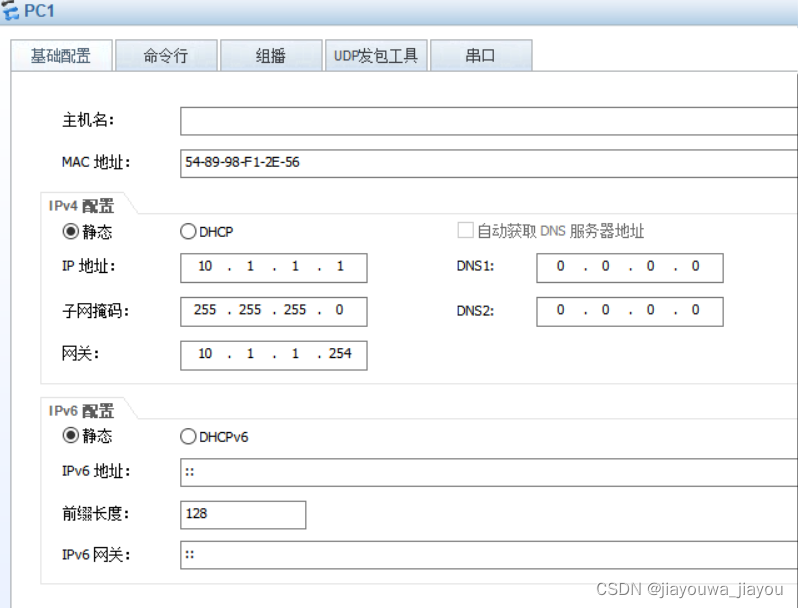PC2配置IP網(wǎng)關(guān)
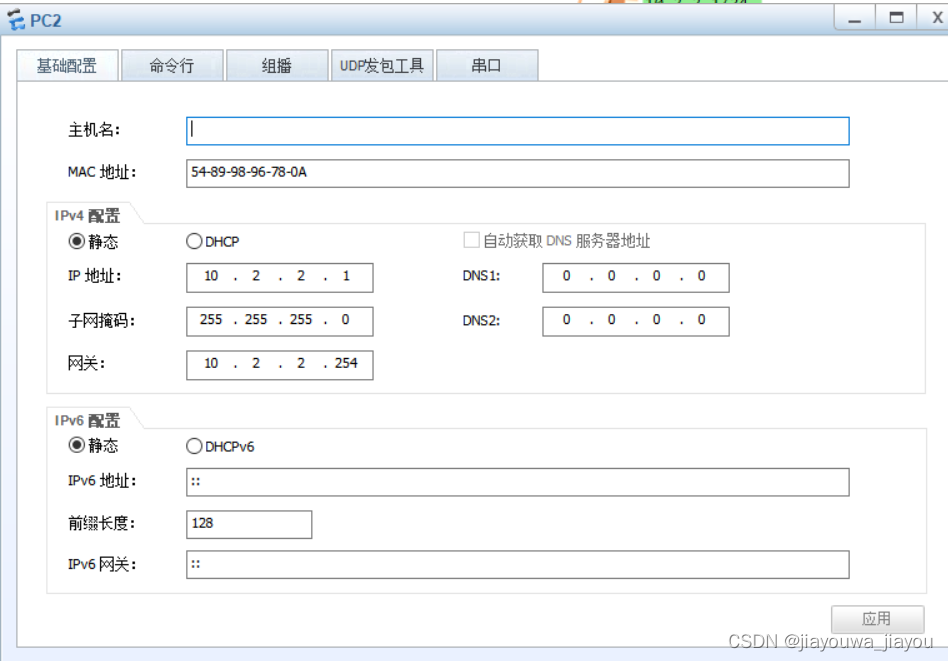PC3配置IP網(wǎng)關(guān)
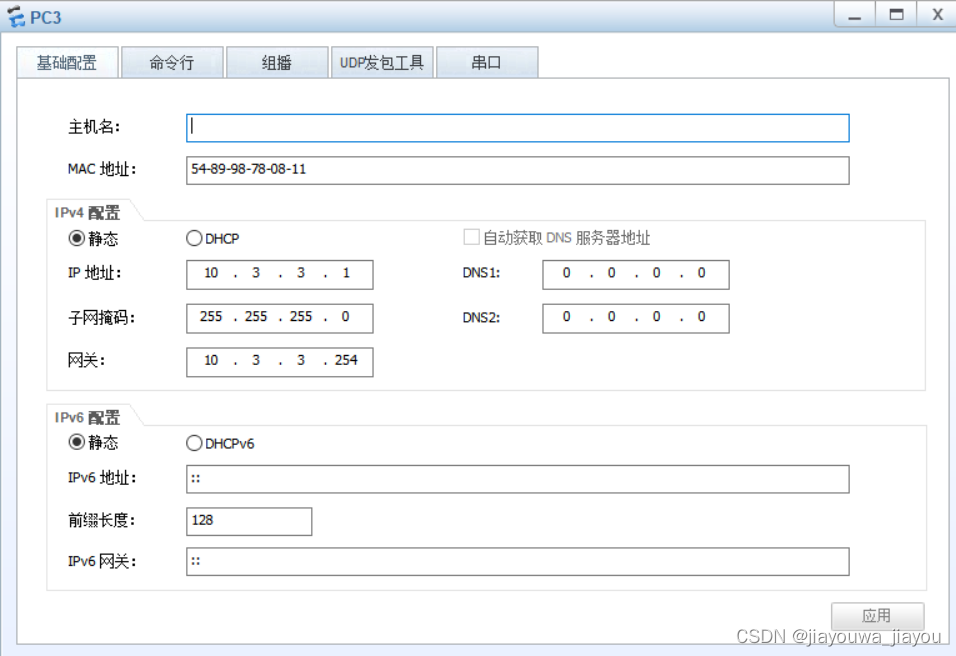R1配置命令
system-view
[Huawei]sysname R1
[R1]int GigabitEthernet 0/0/1
[R1-GigabitEthernet0/0/1]ip address 10.1.1.254 24
Dec 2 2021 20:10:32-08:00 R1 %%01IFNET/4/LINK_STATE(l)[0]:The line protocol IP on the interface GigabitEthernet0/0/1 has entered the UP state.
[R1-GigabitEthernet0/0/1]q
[R1]int GigabitEthernet 0/0/0
[R1-GigabitEthernet0/0/0]ip address 10.1.123.1 24
Dec 2 2021 20:10:54-08:00 R1 %%01IFNET/4/LINK_STATE(l)[1]:The line protocol IP on the interface GigabitEthernet0/0/0 has entered the UP state.
[R1]ip route-static 10.3.3.0 24 10.1.123.3
[R1]ip route-static 10.2.2.0 24 10.1.123.2
#需要和pc2、pc3通信分清目標(biāo)主機(jī)IP地址段和需要經(jīng)過的路段是多少
R2配置命令
system-view
Enter system view, return user view with Ctrl+Z.
[Huawei]sysname R2
[R2]interface GigabitEthernet 0/0/2
[R2-GigabitEthernet0/0/2]ip address 10.1.123.2 24
Dec 2 2021 20:11:54-08:00 R2 %%01IFNET/4/LINK_STATE(l)[0]:The line protocol IP on the interface GigabitEthernet0/0/2 has entered the UP state.
[R2-GigabitEthernet0/0/2]q
[R2]int GigabitEthernet 0/0/1
[R2-GigabitEthernet0/0/1]ip address 10.2.2.254 24
Dec 2 2021 20:12:13-08:00 R2 %%01IFNET/4/LINK_STATE(l)[1]:The line protocol IP on the interface GigabitEthernet0/0/1 has entered the UP state.
[R2-GigabitEthernet0/0/1]q
[R2]ip route-static 10.1.1.0 24 10.1.123.1
#pc2進(jìn)行reply的目標(biāo)主機(jī)段和需要經(jīng)過的路段
R3配置命令
system-view
Enter system view, return user view with Ctrl+Z.
[Huawei]sysname R3
[R3]int g
[R3]int GigabitEthernet 0/0/1
[R3-GigabitEthernet0/0/1]ip address 10.3.3.254 24
Dec 2 2021 20:12:50-08:00 R3 %%01IFNET/4/LINK_STATE(l)[0]:The line protocol IP on the interface GigabitEthernet0/0/1 has entered the UP state.
[R3-GigabitEthernet0/0/1]q
[R3]interface GigabitEthernet 0/0/0
[R3-GigabitEthernet0/0/0]ip address 10.1.123.3 24
Dec 2 2021 20:13:14-08:00 R3 %%01IFNET/4/LINK_STATE(l)[1]:The line protocol IP on the interface GigabitEthernet0/0/0 has entered the UP state.
[R3-GigabitEthernet0/0/0]q
[R3]ip route-static 10.1.1.0 24 10.1.123.1
#pc3reply的目標(biāo)主機(jī)段和需要經(jīng)過的地址段
總結(jié)
以上是生活随笔為你收集整理的华为ensp静态路由配置的全部內(nèi)容,希望文章能夠幫你解決所遇到的問題。

- 上一篇: SQL Server修改表结构时,不允许
- 下一篇: PBRT的scene.pbrt使用方法