###**最近領導要求全景圖的展示效果跟XX公司做的一樣,仔細研究了一下XX公司的效果,發現用的是krpano,了解了krpano后,就要將krpano功能化,做成一個功能。很多全景公司采用krpano做,只要集成了一個krpano,效果也可以做的跟他們一樣。難點是,krpano每生成處理一張全景圖,都會生成很多個文件夾,怎么將它功能化?**
第一件想到的當然是百度!可是沒找到有價值的情報。
**于是google,找到了一篇寫的很好很好,但是在百度搜索搜不到的博客:http://blog.csdn.net/u012084981/article/details/76382991,博主也是一個很好的人,我向他要了源代碼,自己研究,然后根據自己的見解寫了這篇博客。**
先仔細觀察krpano,可以發現,krpano生成的文件夾有一些是可以復用的,看下圖,用鼠標將兩張圖tset.jpg和test2.jpg拖拽進krpano的MAKE VTOUR (NORMAL)droplet.bat
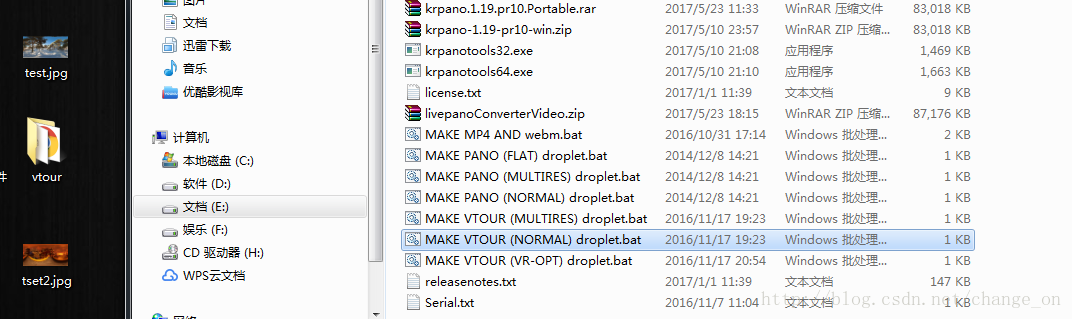
會先后生成一個叫vtour的文件夾,為了區分,我重命名為vtuor和vtour2,然后再來看看生成的兩個vtour文件夾
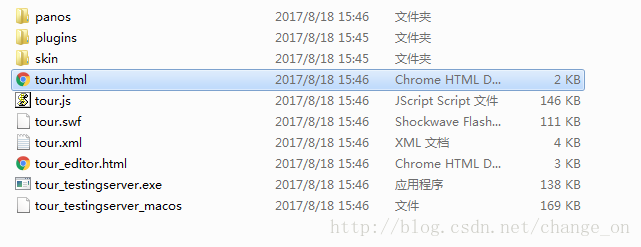
在java web開發環境中,我們新建一個web project,將vtour文件夾拷貝到web root下,發布即可訪問,
當然這是靜態的,我們是要做成動態的網頁。通過這兩個vtour文件夾的對比(用Beyond Compare 4 軟件對比),可以發現:
-
panos文件夾保存的是每張全景圖生成的小圖片,是動態變化的
-
plugins是各種效果的插件文件夾,是公有的
-
skin也是公有的
-
tour.html是一樣的,是訪問入口,也是公有的
-
tour.js是不一樣的
-
tour.swf是不一樣的
-
tour.xml是不一樣的
后面的tour_editor.html、tour_testingserver.exe、tour_testingserver_macos這幾個是修改全景圖的,顯示時不會用到的,刪掉了。
所以,只要保證tour.html能動態的讀取到panos、tour.js、tour.swf、tour.xml就行了,用最笨的方法,在web root新建一個文件夾,專門處理krpano,就是vshow,將靜態的文件夾拷進去,當用戶每上傳一張全景圖時,先在臨時文件夾為他生成全部文件,然后再將幾個不一致的文件整合進一個文件夾,將該文件夾放在vshow里面,這個文件夾是動態的,每個用戶都不一樣,因此,我是用圖片id命名的,生成后的結構如下:
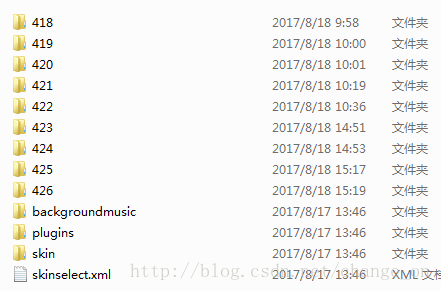
這些418、419、420…是動態的,每次訪問不同的圖片時,前臺傳給后臺圖片id即可,至于訪問入口,可以把tour.html的內容拷進一個通用的jsp,只要在里面訪問不同圖片id的不同panos、tour.js、tour.swf、tour.xml就行。
下面的代碼除了展示全景效果圖外,還有背景音樂!給出核心代碼:
CmdBat.java
package com.xforce.krpano.util;import java.io.BufferedReader;
import java.io.File;
import java.io.FileInputStream;
import java.io.FileOutputStream;
import java.io.IOException;
import java.io.InputStream;
import java.io.InputStreamReader;import javax.xml.parsers.DocumentBuilder;
import javax.xml.parsers.DocumentBuilderFactory;
import javax.xml.parsers.ParserConfigurationException;
import javax.xml.transform.OutputKeys;
import javax.xml.transform.Transformer;
import javax.xml.transform.TransformerException;
import javax.xml.transform.TransformerFactory;
import javax.xml.transform.dom.DOMSource;
import javax.xml.transform.stream.StreamResult;import org.w3c.dom.Document;
import org.w3c.dom.Element;
import org.w3c.dom.Node;
import org.w3c.dom.NodeList;
import org.xml.sax.SAXException;public class CmdBat {/*public static void main(String[] args) {String dpath = "D:\\apache-tomcat-8.0.33\\webapps\\krpano\\vshow";String file = "353";String[] fn1 = {};String[] fn2 = {};String title = "yyyyyyyy";String temppath = "f:\\temp-room\\";String music = "vshow/backgroundmusic/default.mp3";try {setKrpano(dpath, file,temppath, fn1, fn2, title,music);} catch (InterruptedException e) {e.printStackTrace();System.out.println("上傳失敗");}}*/public static void setKrpano(final String dpath, final String file,final String temppath, final String[] fn1, final String[] fn2, final String title,final String music)throws InterruptedException {String path = temppath + file;File targetFile = new File(path); if(!targetFile.exists()){ targetFile.mkdirs(); } String ex = "krpanotools32.exe makepano -config=\\templates\\vtour-normal.config "+ path + "\\*.jpg";Runtime runtime = Runtime.getRuntime();boolean b = true;Process p = null;try {p = runtime.exec("cmd /c start f:\\krpano\\krpano-1.19-pr10-postable\\" + ex);} catch (Exception e) {b = false;}if (b) {final InputStream is1 = p.getInputStream();final InputStream is2 = p.getErrorStream();new Thread() {public void run() {BufferedReader br1 = new BufferedReader(new InputStreamReader(is1));try {String line1 = null;while ((line1 = br1.readLine()) != null) {if (line1 != null) {System.out.println("=AA==========line1======"+ line1);}}} catch (IOException e) {e.printStackTrace();} finally {try {is1.close();// 執行文件復制File f = new File(dpath + "\\" + file);f.mkdirs();// 創建目錄// 復制文件boolean b1 = copyFile(temppath + file+ "\\vtour\\tour.js", dpath + "\\" + file+ "\\tour.js");if (b1) {boolean b2 = copyFile(temppath + file+ "\\vtour\\tour.swf", dpath + "\\"+ file + "\\tour.swf");if (b2) {boolean b3 = copyFile(temppath+ file + "\\vtour\\tour.xml", dpath+ "\\" + file + "\\tour.xml");if (b3) {// 復制文件夾boolean b4 = copyFolder(temppath + file+ "\\vtour\\panos",dpath + "\\" + file + "\\panos");if (b4) {// 刪除臨時生成文件delFolder(temppath + file);// 修改krpano文件內容String xmlPath = dpath + "\\"+ file + "\\tour.xml";File xmlFile = new File(xmlPath);DocumentBuilderFactory dbFactory = DocumentBuilderFactory.newInstance();DocumentBuilder dBuilder;try {dBuilder = dbFactory.newDocumentBuilder();Document doc = dBuilder.parse(xmlFile);doc.getDocumentElement().normalize();for (int i = 0; i < fn1.length; i++) {updateAttributeValue(doc,fn1[i], fn2[i]);}// update Element valueupdateElementValue(doc, title);// delete elementdeleteElement(doc);// add new elementaddElement(doc);updateAttributeColorValue(doc,"0x000000");addMusicElement(doc,music);// write the updated document to// file or consoledoc.getDocumentElement().normalize();TransformerFactory transformerFactory = TransformerFactory.newInstance();Transformer transformer = transformerFactory.newTransformer();DOMSource source = new DOMSource(doc);StreamResult result = new StreamResult(new File(xmlPath));transformer.setOutputProperty(OutputKeys.INDENT,"yes");transformer.transform(source,result);//生成成功/*System.out.println("XML file updated successfully");*/} catch (Exception e1) {e1.printStackTrace();//生成失敗}}}}}} catch (IOException e) {e.printStackTrace();}}}}.start();new Thread() {public void run() {BufferedReader br2 = new BufferedReader(new InputStreamReader(is2));try {String line2 = null;while ((line2 = br2.readLine()) != null) {if (line2 != null) {System.out.println("=AA==========line2======"+ line2);}}} catch (IOException e) {e.printStackTrace();} finally {try {is2.close();} catch (IOException e) {e.printStackTrace();}}}}.start();p.waitFor();p.destroy();} else {System.out.println("上傳失敗");}}/*** 復制單個文件* * @param oldPath* String 原文件路徑 如:c:/fqf.txt* @param newPath* String 復制后路徑 如:f:/fqf.txt* @return boolean*/public static boolean copyFile(String oldPath, String newPath) {try {int bytesum = 0;int byteread = 0;File oldfile = new File(oldPath);if (oldfile.exists()) { // 文件存在時InputStream inStream = new FileInputStream(oldPath); // 讀入原文件FileOutputStream fs = new FileOutputStream(newPath);byte[] buffer = new byte[1444];int length;while ((byteread = inStream.read(buffer)) != -1) {bytesum += byteread; // 字節數 文件大小// System.out.println(bytesum);fs.write(buffer, 0, byteread);}inStream.close();}} catch (Exception e) {// System.out.println("復制單個文件操作出錯");e.printStackTrace();return false;}return true;}/*** 復制整個文件夾內容* * @param oldPath* String 原文件路徑 如:c:/fqf* @param newPath* String 復制后路徑 如:f:/fqf/ff* @return boolean*/public static boolean copyFolder(String oldPath, String newPath) {try {(new File(newPath)).mkdirs(); // 如果文件夾不存在 則建立新文件夾File a = new File(oldPath);String[] file = a.list();File temp = null;for (int i = 0; i < file.length; i++) {if (oldPath.endsWith(File.separator)) {temp = new File(oldPath + file[i]);} else {temp = new File(oldPath + File.separator + file[i]);}if (temp.isFile()) {FileInputStream input = new FileInputStream(temp);FileOutputStream output = new FileOutputStream(newPath+ "/" + (temp.getName()).toString());byte[] b = new byte[1024 * 5];int len;while ((len = input.read(b)) != -1) {output.write(b, 0, len);}output.flush();output.close();input.close();}if (temp.isDirectory()) {// 如果是子文件夾copyFolder(oldPath + "/" + file[i], newPath + "/" + file[i]);}}} catch (Exception e) {// System.out.println("復制整個文件夾內容操作出錯");e.printStackTrace();return false;}return true;}// 刪除文件夾public static void delFolder(String folderPath) {try {delAllFile(folderPath); // 刪除完里面所有內容String filePath = folderPath;filePath = filePath.toString();java.io.File myFilePath = new java.io.File(filePath);myFilePath.delete(); // 刪除空文件夾} catch (Exception e) {e.printStackTrace();}}public static boolean delAllFile(String path) {boolean flag = false;File file = new File(path);if (!file.exists()) {return flag;}if (!file.isDirectory()) {return flag;}String[] tempList = file.list();File temp = null;for (int i = 0; i < tempList.length; i++) {if (path.endsWith(File.separator)) {temp = new File(path + tempList[i]);} else {temp = new File(path + File.separator + tempList[i]);}if (temp.isFile()) {temp.delete();}if (temp.isDirectory()) {delAllFile(path + "/" + tempList[i]);// 先刪除文件夾里面的文件delFolder(path + "/" + tempList[i]);// 再刪除空文件夾flag = true;}}return flag;}private static void addElement(Document doc) {NodeList employees = doc.getElementsByTagName("krpano");Element emp = null;// loop for each employeefor (int i = 0; i < employees.getLength(); i++) {emp = (Element) employees.item(i);Element vtourskin = doc.createElement("include");vtourskin.setAttribute("url", "../skin/vtourskin.xml");emp.appendChild(vtourskin);Element skinselect = doc.createElement("include");skinselect.setAttribute("url", "../skinselect.xml");emp.appendChild(skinselect);}}private static void addMusicElement(Document doc,String music) {NodeList employees = doc.getElementsByTagName("krpano");Element emp = null;// loop for each employeefor (int i = 0; i < employees.getLength(); i++) {emp = (Element) employees.item(i);Element musicEl = doc.createElement("action");musicEl.setAttribute("name", "bgsnd_action");musicEl.setAttribute("autorun", "onstart");musicEl.appendChild(doc.createTextNode("playsound(bgsnd, '"+music+"', 0);"));emp.appendChild(musicEl);}}private static void deleteElement(Document doc) {NodeList employees = doc.getElementsByTagName("krpano");Element emp = null;// loop for each employeefor (int i = 0; i < employees.getLength(); i++) {emp = (Element) employees.item(i);Node genderNode = emp.getElementsByTagName("include").item(0);emp.removeChild(genderNode);}}private static void updateElementValue(Document doc, String title) {NodeList employees = doc.getElementsByTagName("krpano");Element emp = null;// loop for each employeefor (int i = 0; i < employees.getLength(); i++) {emp = (Element) employees.item(i);emp.setAttribute("title", title);}}private static void updateAttributeValue(Document doc, String oldname,String newname) {NodeList employees = doc.getElementsByTagName("scene");Element emp = null;// loop for each employeefor (int i = 0; i < employees.getLength(); i++) {emp = (Element) employees.item(i);if (emp.getAttribute("title").equals(oldname)) {emp.setAttribute("title", newname);break;}}}private static void updateAttributeColorValue(Document doc, String newname) {NodeList employees = doc.getElementsByTagName("skin_settings");Element emp = null;// loop for each employeefor (int i = 0; i < employees.getLength(); i++) {emp = (Element) employees.item(i);emp.setAttribute("design_bgcolor", newname);emp.setAttribute("design_bgalpha", "0.8");}}
}
在控制層使用:ShareController.java
package com.xforce.krpano.controller;import java.io.IOException;
import java.util.Date;
import java.util.HashMap;
import java.util.Map;import javax.servlet.http.HttpServletRequest;import org.springframework.beans.factory.annotation.Autowired;
import org.springframework.context.annotation.Scope;
import org.springframework.stereotype.Controller;
import org.springframework.ui.Model;
import org.springframework.web.bind.annotation.RequestMapping;
import org.springframework.web.bind.annotation.RequestParam;
import org.springframework.web.multipart.MultipartFile;
import org.springframework.web.servlet.ModelAndView;import com.xforce.krpano.model.Upload;
import com.xforce.krpano.service.ShareService;
import com.xforce.krpano.util.CmdBat;
import com.xforce.krpano.util.FileUpload;
import com.xforce.krpano.util.FileUtil;
import com.xforce.krpano.util.GreaterQiniuUtil;
import com.xforce.krpano.util.QiniuUtil;@Controller
@Scope("prototype")
public class ShareController {...//分享@RequestMapping("share")public ModelAndView share(Model model, HttpServletRequest request, @RequestParam(value = "file") MultipartFile file) {...//做處理String newGilePath = path + "\\"+ upload.getId() + "\\";FileUtil.moveFile(filePath, newGilePath);String dpath = request.getSession().getServletContext().getRealPath("vshow");String[] fn1 = {};String[] fn2 = {};String title = "xxxxx";String music = "vshow\\backgroundmusic\\default.mp3";String uploadId = upload.getId()+"";try {CmdBat.setKrpano(dpath, uploadId , path + "/", fn1, fn2, title,music);} catch (InterruptedException e) {// TODO Auto-generated catch blocke.printStackTrace();} try {Thread.sleep(4000);mv = new ModelAndView();Map<String, Object> map = new HashMap<String, Object>();map.put("uploadId", Integer.parseInt(uploadId));map.put("title",title);mv.addAllObjects(map);mv.setViewName("share");} catch (NumberFormatException e) {// TODO Auto-generated catch blocke.printStackTrace();} catch (InterruptedException e) {// TODO Auto-generated catch blocke.printStackTrace();}return mv;}}
通用jsp
<%@ page language="java" import="java.util.*" pageEncoding="UTF-8" isELIgnored="false"%>
<%
String path = request.getContextPath();
String basePath = request.getScheme()+"://"+request.getServerName()+":"+request.getServerPort()+path+"/";
%>
<!DOCTYPE html>
<html>
<head>
<base href="<%=basePath%>"><title>${title }</title><meta name="viewport" content="width=device-width, initial-scale=1.0, minimum-scale=1.0, maximum-scale=1.0" /><meta name="apple-mobile-web-app-capable" content="yes" /><meta name="apple-mobile-web-app-status-bar-style" content="black" /><meta http-equiv="Content-Type" content="text/html;charset=utf-8" /><meta http-equiv="x-ua-compatible" content="IE=edge" /><style>@-ms-viewport { width:device-width; }@media only screen and (min-device-width:800px) { html { overflow:hidden; } }html { height:100%; }body { height:100%; overflow:hidden; margin:0; padding:0; font-family:Arial, Helvetica, sans-serif; font-size:16px; color:#FFFFFF; background-color:#000000; }</style>
</head>
<body>
<div style="position: absolute;z-index: 1;margin-top: 10px;margin-left: 10px">
</div>
<script src="http://10.10.3.56:8080/K/vshow/${uploadId }/tour.js"></script>
<div id="pano" style="width:100%;height:100%;"><noscript><table style="width:100%;height:100%;"><tr style="vertical-align:middle;"><td><div style="text-align:center;">ERROR:<br/><br/>Javascript not activated<br/><br/></div></td></tr></table></noscript><script>var uploadId = "${uploadId}";embedpano({swf:"http://10.10.3.56:8080/K/vshow/${uploadId }/tour.swf", xml:"http://10.10.3.56:8080/K/vshow/${uploadId }/tour.xml", target:"pano", html5:"prefer", mobilescale:1.0, passQueryParameters:true});</script>
</div></body>
</html>
來看看震撼的效果:

注意事項
-
1.java執行批處理用的是Runtime.getRuntime().exec(); 這里面全用字符串,利用krpanotools32去執行命令,每個文件夾的關系是\,這和原來的博客區分,原來是:-config=templates,我改為:-config=\templates
-
2.如果頻繁的報刪除文件,文件找不到的錯,仔細看看臨時存放路徑有沒有錯,全景圖路徑有沒有錯
-
3.如果是上傳在顯示,注意時間,生成文件io操作的速度比跳轉頁面的速度慢很多,可能會出現頁面跳轉了,報找不到tour.js(404)錯誤,只要讓執行生成全景文件的線程在跳轉線程完成前即可
-
4.動態化的界面背景音樂不能播放,這個我也沒琢磨出來
##一定要仔細看路徑!!很容易暈,原來博客博主的文章:http://blog.csdn.net/u012084981/article/details/76382991)
總結
以上是生活随笔為你收集整理的基于java后端的 krpano 功能化的全部內容,希望文章能夠幫你解決所遇到的問題。
如果覺得生活随笔網站內容還不錯,歡迎將生活随笔推薦給好友。

